

Plenty of service businesses run on a spreadsheet, a paper calendar and a stack of carbon-copy invoices, and plenty of them do fine. The question is not whether software is better in general. It is whether, for your business at its current size, a subscription costs less than the time you spend working around not having one. This comparison uses a typical five-person business: four technicians and one person in the office.
What a spreadsheet really costs
A spreadsheet has no subscription, but it has a running cost: the paid hours people spend keeping it up to date and moving information between places. In a small service business that time usually goes on:
- Taking calls and copying job details into the schedule.
- Phoning or texting technicians with changes.
- Collecting paper tickets and typing them up.
- Building invoices by hand and chasing unpaid ones.
- Looking up a customer’s history when they call back.
- Technicians calling the office for addresses, notes and part numbers.
None of these tasks is large on its own. Together they add up to hours every week.
Putting numbers on it
Here is a worked example for the five-person business. The office manager spends 12 hours a week on scheduling, invoicing and paperwork at $25 an hour. Each of the four technicians spends about 30 minutes a day on paperwork and phone updates, at a loaded cost of $40 an hour, over 21 working days a month.
| Cost | Calculation | Per month |
|---|---|---|
| Office paperwork time | 12 h × 52 ÷ 12 × $25 | $1,300 |
| Technician paperwork time | 4 × 0.5 h × 21 days × $40 | $1,680 |
| Total paperwork time | $2,980 |
That $2,980 is not all waste; some paperwork is needed whatever system you use. The useful question is how much of it software would remove.
What software costs
Field service software prices vary widely by vendor, plan and number of users. For this example we assume $49 per user per month for five users, which is $245 a month, plus $500 of setup and training time. Check real prices for the products you are considering; many publish them on their websites and most change them from time to time.
The comparison
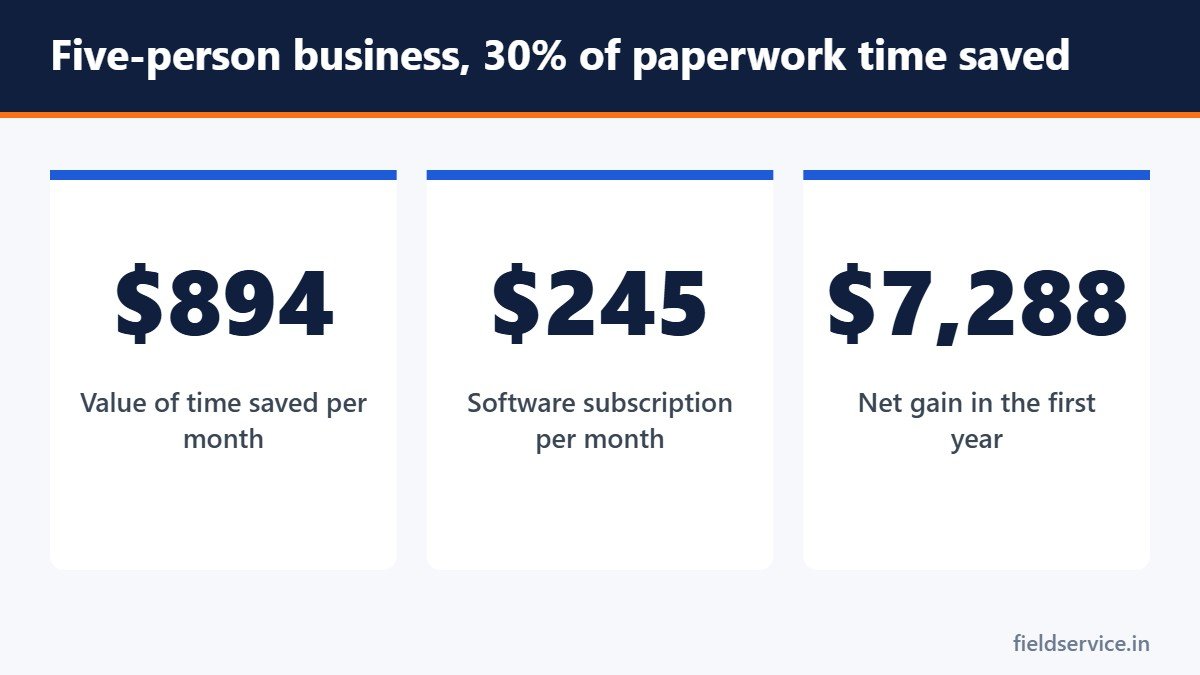
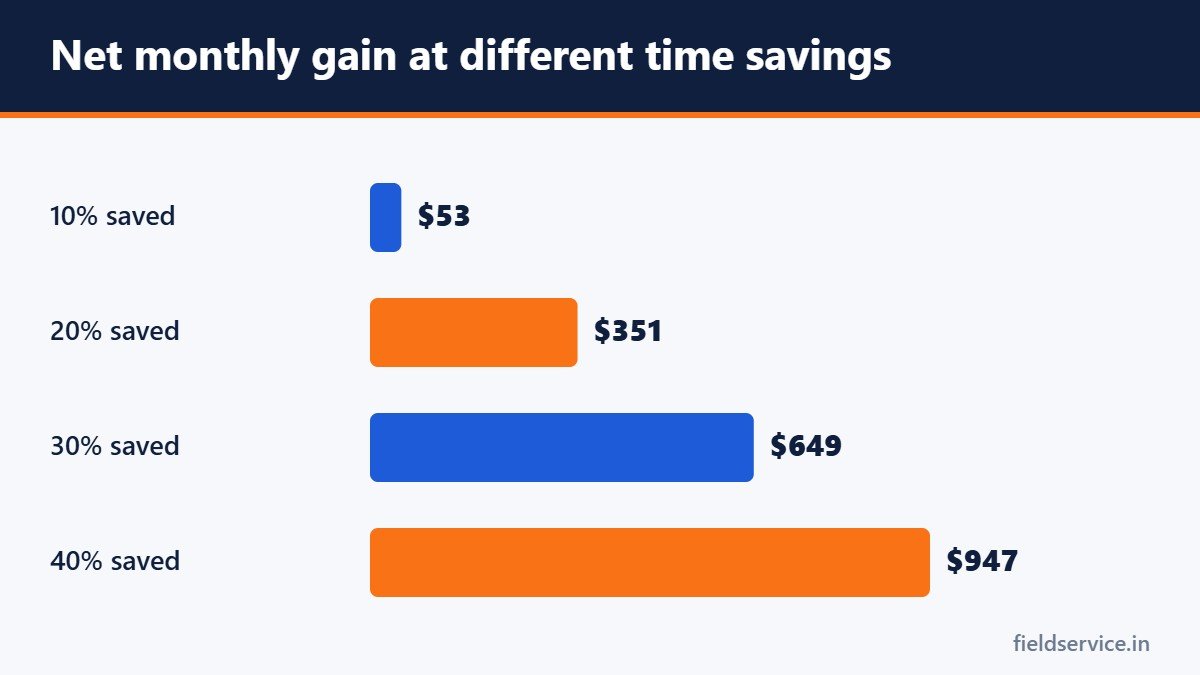
If software removes 30 percent of the paperwork time, it saves 0.30 × $2,980 = $894 a month. After the $245 subscription, the business is $649 a month better off, and the $500 setup cost is recovered in less than a month. Over the first year the net gain is $649 × 12 − $500 = $7,288.
Now test a cautious case. If the software saves only 10 percent of paperwork time, the saving is $298 a month and the net gain is $53 a month. It still pays, but only just. The answer depends on that one estimate, so be honest about it. You can run both cases in the spreadsheet vs software cost calculator.
When a spreadsheet is still the right choice
- You are a one- or two-person business and the schedule fits in your head.
- Most of your work is repeat customers on predictable routes.
- Nobody would use the software consistently, which makes it cost money without saving any.
- Cash is tight and the saved time would not turn into more jobs or lower costs.
When software usually wins
- You have three or more technicians and the schedule changes during the day.
- Invoices go out days after the work, or some never go out at all.
- Customers call back and nobody can find what was done last time.
- You are turning away work because the office cannot keep up.
Software can also bring gains that do not show up as saved time: extra jobs fitted into the day and invoices that no longer slip through. The software payback calculator includes those.
Before you buy
- Write down the three problems you most want to fix.
- Measure how long the current process takes for a week.
- Trial two or three products with real jobs, not demo data.
- Count every cost: users, add-ons, payment fees and setup time.
- Plan who will set it up and how technicians will be trained.
Our guide to choosing field service software goes through the selection process in detail.
Related guides
Three Excel workbooks that take you from what a technician costs to what to charge, then show whether each job made money.
Not sure yet? Try two forms free or see all packs.
Free Software Switching Kit: a selection scorecard in Excel and a six-week switching checklist.
Frequently asked questions
Can a small service business run on spreadsheets?
Yes, many do, especially with one or two people and simple schedules. The cost is the time spent maintaining them and moving information between places, which grows as the business grows.
How much does field service software cost?
Prices vary widely by vendor, plan and number of users, and they change over time. Check current prices on each vendor’s website and count add-ons such as payments or text messaging.
How do I know if software will pay for itself?
Estimate the paid time it would save each month, value it at what that time costs you, and compare the result with the subscription and setup costs. Use a cautious estimate of time saved.
What is the biggest risk when switching to software?
Paying for a system that the team does not use consistently. Plan setup and training before you buy.
Figures in this article are examples. Software prices and features change; check current details with each vendor.